Joomla 6 Mitteilung

Wir freuen uns mitteilen zu können, dass seit dem 14. Oktober 2025 alle unsere Joomla Erweiterungen mit Joomla 6 kompatible sind.

Für alle die gerade noch von Joomla 3 auf 4 aktualisieren: Anleitungen für die Joomla 4 Migration gibt es hier:

Es gibt eine eigenständige Dokumentation für Visforms für Joomla 4 und eine für Visforms auf Joomla 5 und 6

Forum

Visforms Subscription Inhaber können in unserem Forum Fragen stellen. Bitte mit dem entsprechenden Benutzer anmelden.
Jeder kann lesend auf das Forum zugreifen.

Bitte stellen Sie nur 1 Frage pro Thema.

Wichtige Angaben für fast jede Frage:
V1: Welche Visforms-Version läuft?
V2: Welche Joomla-Version läuft?
V3: Welche PHP-Version läuft?

Field Label returned in result, not Field Value

Mehr
4 Tage 4 Stunden her #12077 von gggraphics
Field Label returned in result, not Field Value wurde erstellt von gggraphics
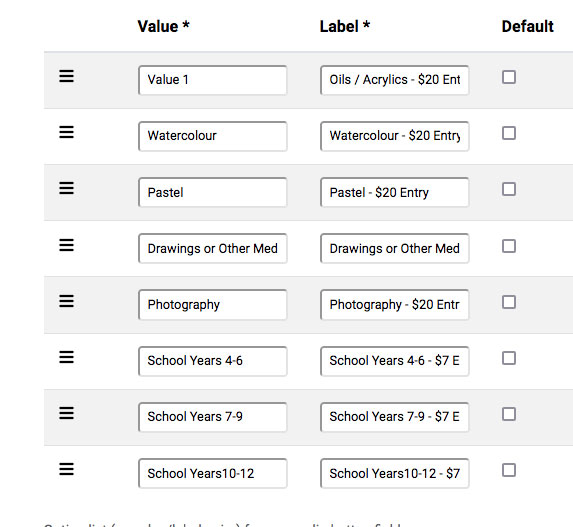
Hi- I'm having an issue where I have a set of Radio Buttons with various category options for a local art show.
When the user makes a selection, the value returned is the option Label, not the option Value. For example, selecting the first option in this list returns the value "Oils / Acrylics - $20 Entry", not "Value 1"
I'm getting the same result with a pull-down options list.

Visforms Version 4.4.3
PHP 8.1.34
Joomla 4.4.10   

Mehr
3 Tage 14 Stunden her #12078 von Administrator IV
Administrator IV antwortete auf Field Label returned in result, not Field Value
Hello gggraphics,

Thank you for the version information.

What exactly do you mean by 'the value returned'?

Please describe precisely where, as a user or administrator, you expect to see the options value but instead see the options label.

Kind regards, Ingmar

:idea: I recommend you the new and up-to-date documentation for Joomla 5:
docs.joomla-5.visforms.vi-solutions.de/en/docs/
Most of this also applies retrospectively to Joomla 4.
Please only ask 1 question per topic :-).

:idea: Ich empfehle Dir die neue und aktuelle Dokumentation für Joomla 5:
docs.joomla-5.visforms.vi-solutions.de/docs/
Das meiste gilt rückwirkend auch für Joomla 4.
Bitte immer nur 1 Frage pro Thema stellen :-).

Mehr
3 Tage 6 Stunden her - 3 Tage 1 Stunde her #12082 von gggraphics
Thanks Ingmar - had a look at the J5 documentation, but can't see anything there that affects what I'm doing.

For example, in the backend, I'm setting the Option (that the User sees in the frontend) as "Oils / Acrylics - $20 Entry", with a Value (what I expect to get back in the Result email) of "Value 1". When the form is actually submitted, what I, and the User get in the Result email is:
Entry 1 Category : Oils /Acrylic - $20 Entry
What I'm expecting is
Entry 1 Category : Value 1

It is quite possible I've set this up incorrectly, but I can't see what I'm doing wrong. It seems to only return the Label for this field, instead of the Value that's been set.

*** Follow Up***
I have another field on the form with the Label "Entry Fee $20" and the Value "20.00". If the User selects this option, it too returns the result "Entry Fee $20", but the 20.00 value is used correctly in the calculation field. The instructions say "Value is the value, that is submitted with the form, if this option is selected. Label is the option label, which is visible to the user." It's possible I'm misinterpreting what this means.

*** Follow Up #2***
I've just had a look at the datasets. "Value" is recorded there correctly. I'm interpreting "submitted with the form" as meaning "sent back to the user" - that might not be what you intended.
Letzte Änderung: 3 Tage 1 Stunde her von gggraphics. Begründung: More information

Mehr
2 Tage 18 Stunden her - 1 Tag 18 Stunden her #12084 von Administrator IV
Administrator IV antwortete auf Field Label returned in result, not Field Value
Hello gggraphics,

I'm glad you've looked at our documentation on your topic.
But perhaps not in the most relevant sections yet.

Background:

You need to better understand the difference in meaning between Option Value and Option Label.

Option Value:
- is an internal, technically used value
- is transmitted in the form POST request
- is stored in the database in the submitted form data record
- is used to identify the selected option
- must be unique.

Option Label:
- is the value visible to the user
- is a meaningful and self-explanatory term for the user
- is NOT transmitted in the form POST request
- is used wherever the selected option is displayed to a user
- is stored in the database in the form configuration record.

Solution:

With Visforms, you can configure at any point which part of the option you want to display:
- the value or
- the label or
- both and
- in some cases the display format and
- in some cases the displayed information.
This is described in the documentation.

Visforms placeholders:
docs.joomla-5.visforms.vi-solutions.de/e...isforms-placeholder/

Data in emails & success messages:
docs.joomla-5.visforms.vi-solutions.de/e...in-result-and-email/

Create PDF Documents >> Structure and Operation:
docs.joomla-5.visforms.vi-solutions.de/e...-template-structure/

Kind regards, Ingmar

:idea: I recommend you the new and up-to-date documentation for Joomla 5:
docs.joomla-5.visforms.vi-solutions.de/en/docs/
Most of this also applies retrospectively to Joomla 4.
Please only ask 1 question per topic :-).

:idea: Ich empfehle Dir die neue und aktuelle Dokumentation für Joomla 5:
docs.joomla-5.visforms.vi-solutions.de/docs/
Das meiste gilt rückwirkend auch für Joomla 4.
Bitte immer nur 1 Frage pro Thema stellen :-).
Letzte Änderung: 1 Tag 18 Stunden her von Administrator IV.

Mehr
2 Tage 5 Stunden her - 1 Tag 18 Stunden her #12085 von gggraphics
Thanks Ingmar - that's a far more detailed explanation, and I am reading through the documentation on Placeholders in result emails, which looks extremely powerful.  In my case, it still looks as though the result is not what I would expect:

According to your reply, the Option Label is NOT transmitted in the form post request, but that's what I'm seeing.
For example the field set:
Label: "Entry 1 Category :"
Option:"Oils /Acrylic $20 Entry"
Value: "Oils /Acrylic"

gives the following in the result email (to User and Admin)
"Entry 1 Category : Oils /Acrylic $20 Entry"

In the database, it's stored as:
"Entry 1 Category : Oils /Acrylic"

This is not a big deal, and the form will work perfectly for us - I'm just puzzled about what I'm doing wrong.
Cheers

Grant
 
Letzte Änderung: 1 Tag 18 Stunden her von Administrator IV.

Mehr
1 Tag 17 Stunden her #12087 von Administrator IV
Administrator IV antwortete auf Field Label returned in result, not Field Value
Hello Grant,

I appreciate your motivation to understand what you're doing and how things react, even down to the smallest detail.
This, among other things, enhances all cognitive transfer skills.

What you see and what you've summarized here is correct and as expected.
Let me try again.

1 - Clarifying terms:

There's an ambiguity surrounding the term "label," which I'd like to clarify and differentiate.

1a - In the context of a form field of the types
- 'Select', 'Select SQL'
- 'Radio Button', 'Radio Button SQL'
- 'Checkbox Group', 'Checkbox Group'
"Label" can mean two things:
- the field label (visible in the form as an identifier for the form field)
- the option label (visible in the form as an identifier for a selectable option)

1b - The terms "transfer" and "transfer."
These refer to the transmission of form data when the form is submitted via a POST request from the web browser (client) to the backend (server).
These do NOT refer to the transmission of form data when sending emails or PDF files to the email recipient.

Your summary is therefore now clearer and more unambiguous.
For example, the field set:
Field-Label: "Entry 1 Category:"
Option-Label: "Oils / Acrylic $20 Entry"
Option-Value: "Oils / Acrylic"

2 - Form Configuration:

I assume you have set the following in the form configuration:
Form Configuration >> Email Options >> Automatically inserted email content >> User inputs = 'Yes'

This will result in at least the following line in the email for each set form field value (excluding empty fields):
[Field-Label] : [Option-Label]

No further modifications or changes to the display are possible for this simple automatic display of user input in the email.
Hence the name 'automatic'.

And that's exactly what you see in the email and have summarized:
[Field Label] : [Option Label]

3 - Explanation of your summary:

3a - Field Label: "Entry 1 Category:"
This comes from the form configuration (database: form configuration record).
It is determined based on the transmitted field ID.

3b - Option Label: "Oils / Acrylic $20 Entry"
This comes from the form configuration (database: form configuration record).
It is determined based on the transmitted option value.

3c - Option Value: "Oils / Acrylic"
This comes from the transmitted form data record (database: form data record).
It is transmitted and stored for every form submission.

4 - Closing Notes

4a - Technically, the option value is used internally everywhere (transaction data).
4b - Field labels and option values ​​are master data that only appear in the administration interface when the respective configuration is changed.
4c - Correction: I suspect that, contrary to what you wrote in your post, the form data record in the database does
- NOT contain 'Entry 1 Category: Oils / Acrylic',
- BUT 'Oils / Acrylic'.

In that case of 4c, everything written would be consistent and as expected, al least for me.

And yes, 'Visform Placeholders' are indeed quite powerful and now completely consistent across all applications.
I appreciate your agreement.

Kind regards, Ingmar

:idea: I recommend you the new and up-to-date documentation for Joomla 5:
docs.joomla-5.visforms.vi-solutions.de/en/docs/
Most of this also applies retrospectively to Joomla 4.
Please only ask 1 question per topic :-).

:idea: Ich empfehle Dir die neue und aktuelle Dokumentation für Joomla 5:
docs.joomla-5.visforms.vi-solutions.de/docs/
Das meiste gilt rückwirkend auch für Joomla 4.
Bitte immer nur 1 Frage pro Thema stellen :-).

Moderatoren: Administrator AVAdministrator IV
Powered by Kunena Forum