Joomla 6 Notice

We are pleased to announce that all our Joomla extensions have been compatible with Joomla 6 since October 14th, 2025.

For those currently upgrading from Joomla 3 to 4: Instructions for Joomla 4 migration can be found here:

There are standalone documentations Visforms Joomla 4, Visforms Joomla 5 and Visforms Joomla 6.

Forum

Visforms Subscription user can ask questions in our forum. Please log in with the relevant user first.
Everybody can access the forum for reading.

Please only ask 1 question per topic.

Important information for almost every question:
V1: Which Visforms version is running?
V2: Which Joomla version is running?
V3: Which PHP version is running?

install problem joomla 6.1.3

More
3 weeks 3 days ago #12579 by bartos.gyula
install problem joomla 6.1.3 was created by bartos.gyula
Hello!On a multilingual site, the paid version does not install after the basic installation (Joomla 6.1.3). There is no error message, just a blank message window.
 

More
3 weeks 3 days ago - 3 weeks 3 days ago #12581 by Administrator IV
Replied by Administrator IV on topic install problem joomla 6.1.3
Hello bartos.gyula,

Thanks for your screenshot.
There are now two ways to proceed.

P1 - PHP debug information
A detailed PHP error report would be very helpful for us (including the full call stack and all related information).
To obtain an accurate PHP error report, please enable maximum debugging in the Joomla administration area before reproducing the error:

Dashboard --> Global Configuration, 'System' tab, 'Debug System' parameter = 'Yes'
Dashboard --> Global Configuration, 'Server' tab, 'Error Reporting' parameter = 'Maximum'

The Visforms log file generated during installation and updates would also be very useful to us.
This log file is located at the following path: .../administrator/logs/visforms_update.php

P2 - Akeeba backup
The question is whether you could provide us with an Akeeba backup of the website for debugging purposes.
We use the following platform for this: wetransfer.com/
Please use the forum email address as the recipient: forum (--at--) vi-solutions.de.
Administrative access to the backend is not sufficient in this case.

Next steps:

S1 - P1: Check whether any error messages appear when PHP debugging is enabled as described above.
S2 - P1: Additionally, check the log file mentioned above for any error entries. 
      To do this, simply use the Joomla menu item Visforms >> Inspector and go to the 'Logging' tab. 
      The Inspector >> View log files:
      docs.joomla-6.visforms.vi-solutions.de/e...r/instector-logging/

S3 - P2: If you do not obtain any further information in steps S1 and S2 that you can share with us
      please proceed with P2.

Kind regards, Ingmar

:idea: I recommend you the new and up-to-date documentation for Joomla 6:
docs.joomla-6.visforms.vi-solutions.de/en/docs/
Please ask only 1 question per topic :-).

:idea: Ich empfehle Dir die neue und aktuelle Dokumentation für Joomla 6:
docs.joomla-6.visforms.vi-solutions.de/docs/
Bitte immer nur 1 Frage pro Thema stellen :-).
Last edit: 3 weeks 3 days ago by Administrator IV.

More
3 weeks 3 days ago - 3 weeks 3 days ago #12582 by Administrator IV
Replied by Administrator IV on topic install problem joomla 6.1.3
Hello bartos.gyula,

Thank you for your Akeeba Backup and the accompanying information.

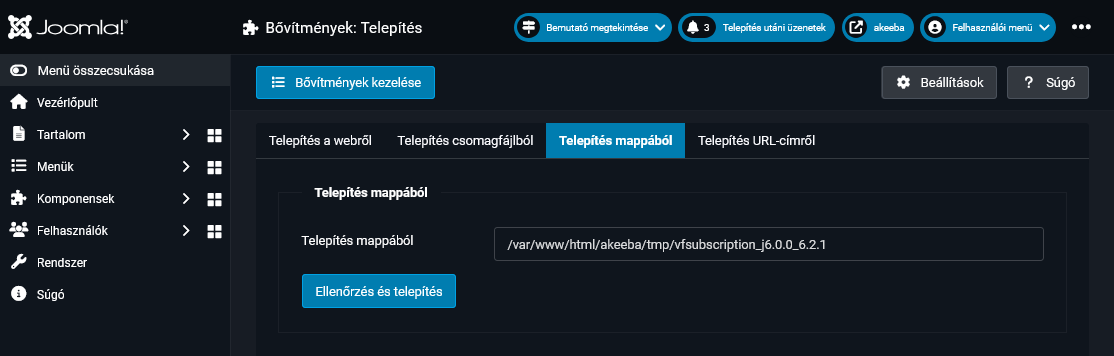
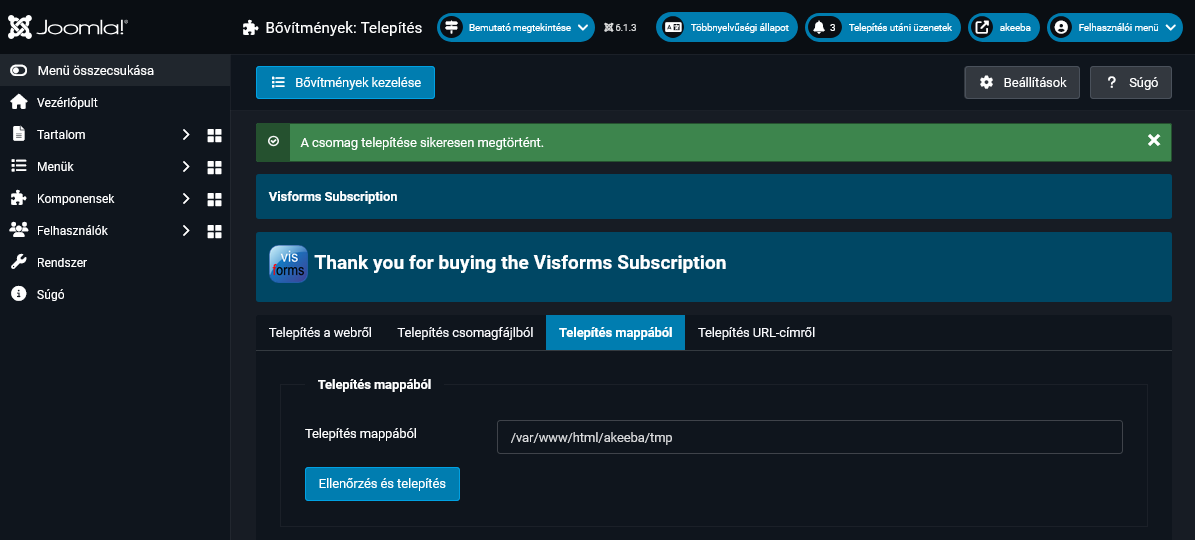
The 'Subscription 6.2.1' had already been successfully installed.

I deployed your Akeeba Backup and performed the 'Subscription 6.2.1' installation under PHP 5.5.5 using the following steps:
- Downloaded 'Visforms Subscription 6.2.1 Joomla 6'
- Unpacked it and placed it in the Joomla temporary directory
- Successfully performed an 'Install from Folder' in the Extension Manager.

vi-solutions.de/forum-uploads/install-pr...oomla-613-before.png
vi-solutions.de/forum-uploads/install-pr...joomla-613-after.png

Conclusion:
Installation via package upload works.
The error lies with your specific server environment (PHP, database server, web server).

Results regarding analysis of the log file visforms_update.php:
R1:
INFO    *** trying to install pdf fonts ***
WARNING    message: fopen( vi-solutions.de/index.php?option=com_vis...er&linktype=pdffonts ): Failed to open stream: Connection timed out

Your web server is preventing the necessary access to the PDF fonts on our website.
The PDF fonts on our website cannot be downloaded and were not installed.

R2:
INFO    ************ package installation: visforms subscription ( 2026-09-27 07:47:21 ) ************
WARNING    Bővítmény Telepítés: MySQL server has gone away

During your 10 attempts to install the subscription, your MySQL server dropped the connection.
This is a serious error.
This explains the notably incomplete error message.

Next steps:
S1 - Attend to your server environment, particularly the reliable availability of your MySQL server.
S2 - Clarify access permissions for external sites (access to the PDF fonts on our website).
S3 - If necessary: ​​Install the PDF fonts manually.
     Pre-install the PDF fonts manually:
      docs.joomla-6.visforms.vi-solutions.de/e...e-pdf-fonts-manually

Kind regards, Ingmar

:idea: I recommend you the new and up-to-date documentation for Joomla 6:
docs.joomla-6.visforms.vi-solutions.de/en/docs/
Please ask only 1 question per topic :-).

:idea: Ich empfehle Dir die neue und aktuelle Dokumentation für Joomla 6:
docs.joomla-6.visforms.vi-solutions.de/docs/
Bitte immer nur 1 Frage pro Thema stellen :-).
Last edit: 3 weeks 3 days ago by Administrator IV.
The following user(s) said Thank You: bartos.gyula

Moderators: Administrator AV, Administrator IV
Powered by Kunena Forum