Joomla 6 Notice

We are pleased to announce that all our Joomla extensions have been compatible with Joomla 6 since October 14th, 2025.

For those currently upgrading from Joomla 3 to 4: Instructions for Joomla 4 migration can be found here:

There are standalone documentations Visforms Joomla 4, Visforms Joomla 5 and Visforms Joomla 6.

Forum

Visforms Subscription user can ask questions in our forum. Please log in with the relevant user first.
Everybody can access the forum for reading.

Please only ask 1 question per topic.

Important information for almost every question:
V1: Which Visforms version is running?
V2: Which Joomla version is running?
V3: Which PHP version is running?

Texteingabe wird Link

More
2 years 8 months ago #9621 by it@pf-t.de
Texteingabe wird Link was created by it@pf-t.de
Hallo zusammen,

ich habe eine Frage. Wir möchten in unserem Intranet ein Telefonverzeichnis anlegen. Es handelt sich um ein ziemliches Standardformular mit Name, Vorname,.. und Durchwahl. Jetzt wäre es natürlich schön, wenn beim Anlegen des Datensatzes, die Formulareingabe in einen Link angezeigt wird, damit man auch anrufen kann wenn man auf die Durchwahl klickt. Ich habe das mit einem anderen Joomla plugin mal so im html Code gelöst :

<a href='Tel:{{ durchwahl }}'>{{ durchwahl }}</a>

Das hat super funktioniert, allerdings bin ich mir wirklich nicht sicher, wie ich das am besten in Viforms anstellen kann. Gibt es da vielleicht einen einfachen Vorschlag, ich bin leider kein Webentwickler. Danke für jeden Hinweis.
 

More
2 years 8 months ago #9627 by Administrator IV
Replied by Administrator IV on topic Texteingabe wird Link
Hallo it@pf-t.de,

diese spezielle Anforderung kannst du in Visforms mit etwas JavaScript lösen.
Eine andere Lösung gibt es leider nicht.

Im folgenden eine komplette kleine Lösung für eine ganz ähnliche Anforderung:
<a href='Tel:postal-code'>postal-code</a>

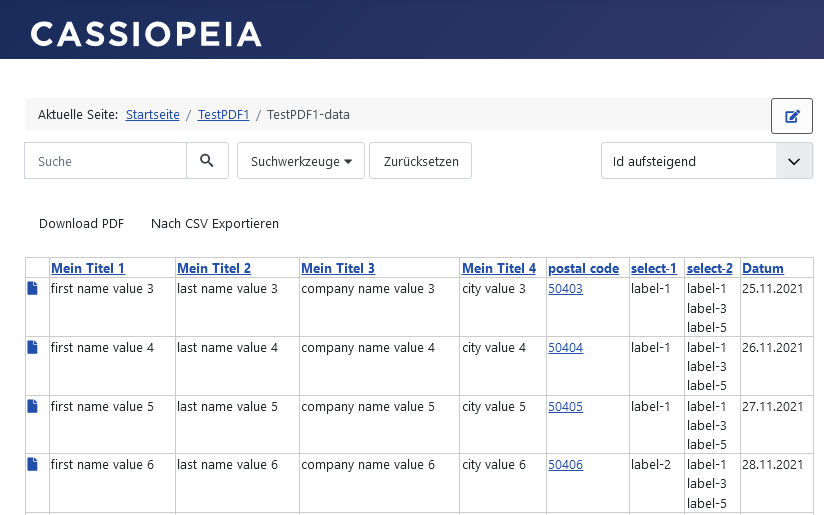
Mit folgendem JavaScript-Code wird der Wert in der Spalte 'postal code' des Formular-Feldes mit der ID 5, in einen ganz ähnlichen anklickbaren Link umgewandelt.
Code:
jQuery(document).ready(function() {     jQuery('table.visdata td.data-f5').each(function () {         const data = jQuery(this).text();         jQuery(this).empty();         jQuery(this).append(`<a href="Tel:${data}" target="_blank">${data}</a>`);     }); });

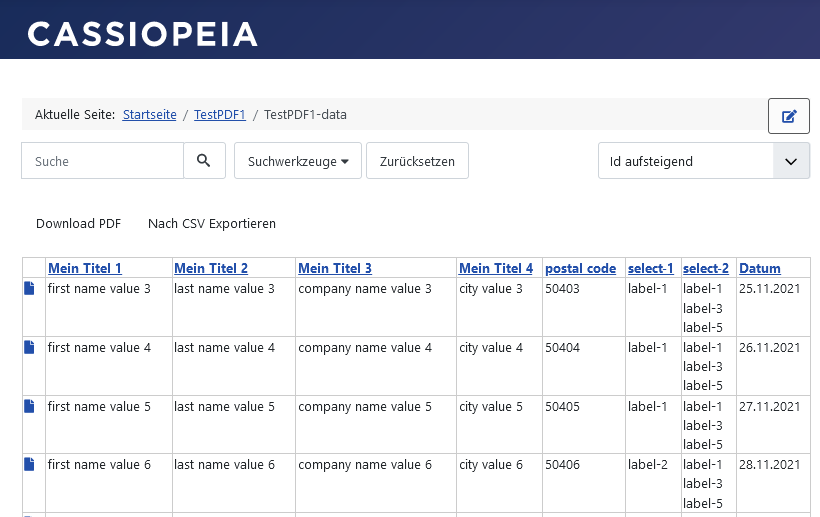
Datenliste ohne den JavaScript-Code:
vi-solutions.de/forum-uploads/data-list-postalcode-normal.png

Datenliste mit dem JavaScript-Code:
vi-solutions.de/forum-uploads/data-list-postalcode-link.png

Formular-Konfiguration 'Front-End-Web-Assets' mit dem JavaScript-Code:
vi-solutions.de/forum-uploads/data-list-...nfiguration-code.png

Das Hinzufügen von JavaScript wird in der Dokumentation beschrieben.
JavaScript und CSS hinzufügen:
docs.joomla-4.visforms.vi-solutions.de/d...a-script-extensions/
Front-End-Web-Assets:
docs.joomla-4.visforms.vi-solutions.de/d...ons/add-script-fewa/

Liebe Grüße, Ingmar

:idea: I recommend you the new and up-to-date documentation for Joomla 6:
docs.joomla-6.visforms.vi-solutions.de/en/docs/
Please ask only 1 question per topic :-).

:idea: Ich empfehle Dir die neue und aktuelle Dokumentation für Joomla 6:
docs.joomla-6.visforms.vi-solutions.de/docs/
Bitte immer nur 1 Frage pro Thema stellen :-).

More
2 years 8 months ago #9629 by it@pf-t.de
Replied by it@pf-t.de on topic Texteingabe wird Link
Das funktioniert wunderbar, vielen Dank für die schnelle Lösung.

Moderators: Administrator AVAdministrator IV
Powered by Kunena Forum